Catch-up fees refer to charges applied for the additional work required when backdating services for a client. In essence, they are billing events from the past. These fees are designed to compensate accounting professionals for the extra effort and resources expended to rectify financial records or perform tasks that should have been completed in the past.
By implementing catch-up fees, accounting practices ensure that they are fairly compensated for the extended effort invested through discrepancies, or overdue tasks. This approach ensures that the financial compensation aligns with the true workload undertaken to bring a client's accounts up to date, reinforcing transparency and fairness in billing practices within the realm of accounting services.
How to set up Catch-up Fees
Catch-up fees are activated on a service by service level, meaning you can have catch-up fees for one service, but not for any you know you wouldn't require this feature for. You can turn on catch-up fees for services using a switch found when editing a service as shown below:
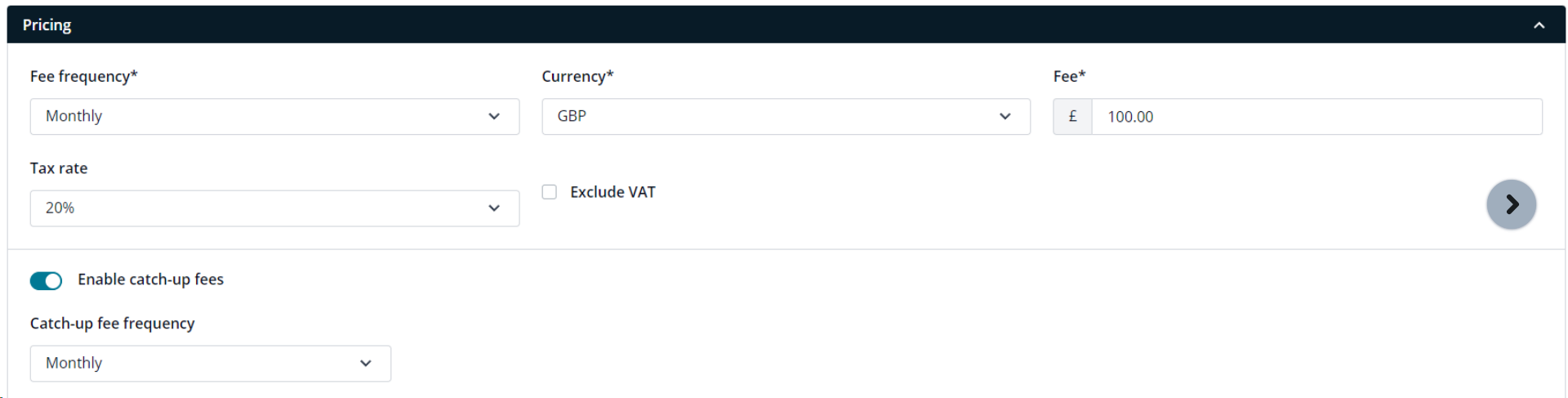
*Note that catch-up fees are only available for services that have a frequency of Monthly or Quarterly, any other frequency will not allow catch-up fees at this time.
When catch-up fees are turned on, you will be able to set the default catch-up fee frequency to monthly or payment on acceptance, this determines how you want your catch-up fees to be paid off, be that splitting the cost over a set number of months or collecting all catch-up fees instantly when the proposal is signed and accepted.
Setting up a proposal
Once you have turned on catch-up fees, they will work automatically when creating a proposal, there’s no additional setup required.
When creating a proposal, you can now set the proposal start date in the past, this will be how catch-up fees are determined.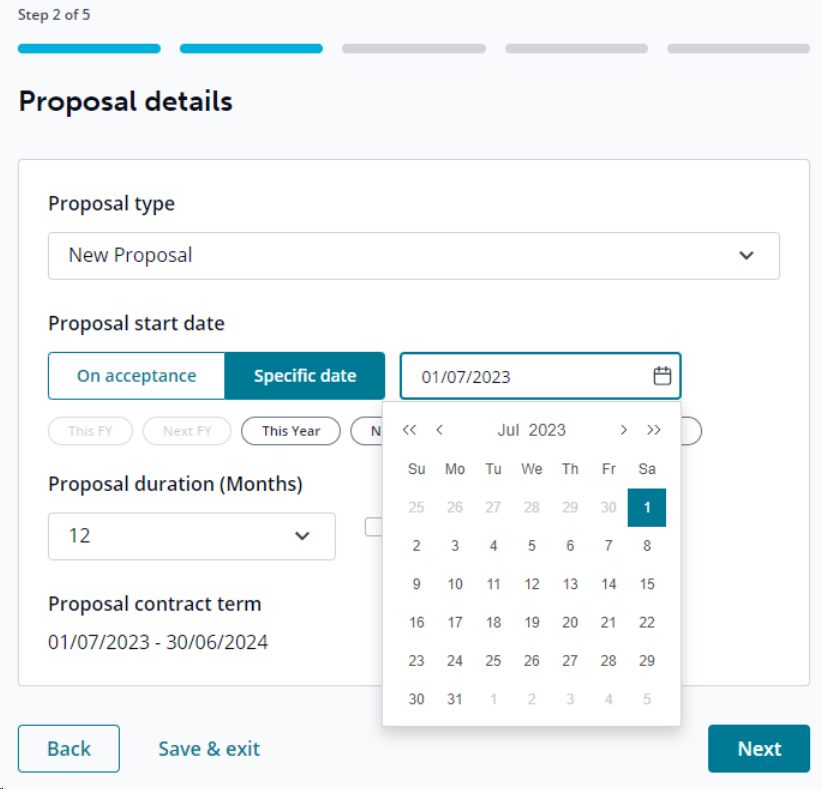
You will also have access to new quick date selection buttons which can set the proposal start date to pre-defined dates including:
By implementing catch-up fees, accounting practices ensure that they are fairly compensated for the extended effort invested through discrepancies, or overdue tasks. This approach ensures that the financial compensation aligns with the true workload undertaken to bring a client's accounts up to date, reinforcing transparency and fairness in billing practices within the realm of accounting services.
How to set up Catch-up Fees
Catch-up fees are activated on a service by service level, meaning you can have catch-up fees for one service, but not for any you know you wouldn't require this feature for. You can turn on catch-up fees for services using a switch found when editing a service as shown below:
*Note that catch-up fees are only available for services that have a frequency of Monthly or Quarterly, any other frequency will not allow catch-up fees at this time.
When catch-up fees are turned on, you will be able to set the default catch-up fee frequency to monthly or payment on acceptance, this determines how you want your catch-up fees to be paid off, be that splitting the cost over a set number of months or collecting all catch-up fees instantly when the proposal is signed and accepted.
Setting up a proposal
Once you have turned on catch-up fees, they will work automatically when creating a proposal, there’s no additional setup required.
When creating a proposal, you can now set the proposal start date in the past, this will be how catch-up fees are determined.
You will also have access to new quick date selection buttons which can set the proposal start date to pre-defined dates including:
- This/Next Client Financial Year End (which can be set on your client record)
- This/Next Year
- This/Next Month
The proposal contract term will be displayed at the bottom of the page so you can confirm the start and end date of the proposal.
Adding services
When services are added, we will check to see if any have catch-up fees activated, for any service with catch-up fees, we will automatically apply the additional fees based on the start date of the proposal and the current date. This will not apply for any services that don't have catch-up fees active, so they will be charged from the current date to the end date of the proposal as normal.
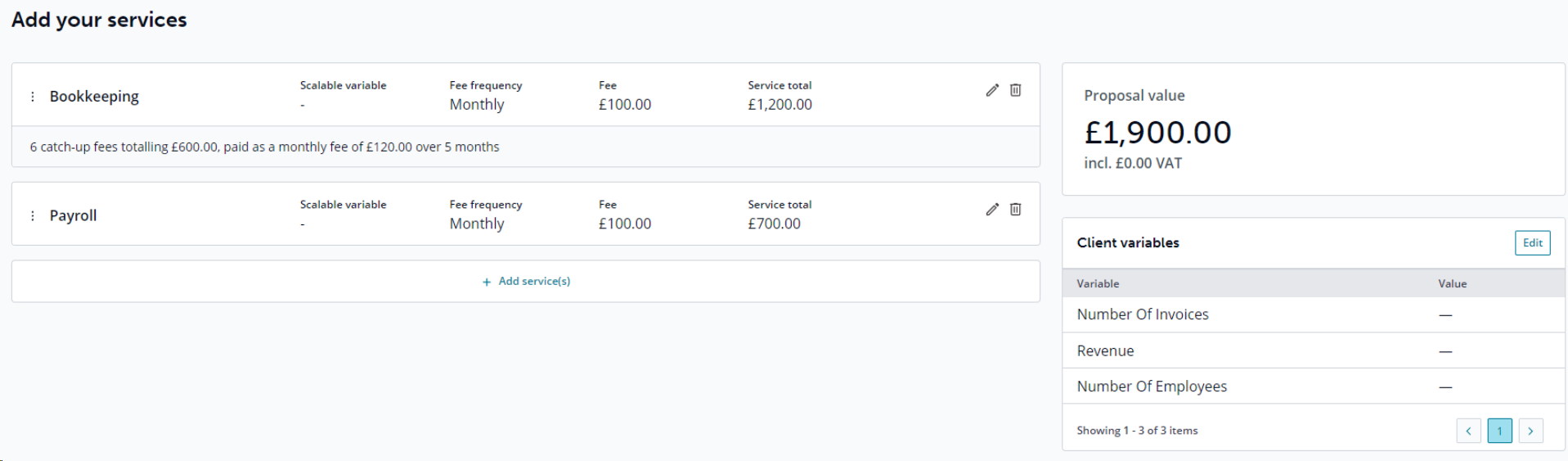
As seen in the example above, Bookkeeping has active catch-up fees, but Payroll does not.
Since the proposal start date was 01/07/2023 and the current date is 20/12/2023, there will be 6 catch-up fees from Jul 23 - Dec 23 totalling £600 catch-up fees, then an additional £600 for Jan 24 - Jun 24 for the ongoing service charge ending on 30/6/2024 making the total cost £1200 for the 12 months.
Payroll does not have catch-up fees, so we will simply be charging Dec 23 - Jun 24 (7 months), totalling £700.
Settlement Date
For any catch-up fees with monthly payments, you will have the ability to edit the settlement date, this is the date you expect your final payment to be completed.
When services are added, we will check to see if any have catch-up fees activated, for any service with catch-up fees, we will automatically apply the additional fees based on the start date of the proposal and the current date. This will not apply for any services that don't have catch-up fees active, so they will be charged from the current date to the end date of the proposal as normal.
As seen in the example above, Bookkeeping has active catch-up fees, but Payroll does not.
Since the proposal start date was 01/07/2023 and the current date is 20/12/2023, there will be 6 catch-up fees from Jul 23 - Dec 23 totalling £600 catch-up fees, then an additional £600 for Jan 24 - Jun 24 for the ongoing service charge ending on 30/6/2024 making the total cost £1200 for the 12 months.
Payroll does not have catch-up fees, so we will simply be charging Dec 23 - Jun 24 (7 months), totalling £700.
Settlement Date
For any catch-up fees with monthly payments, you will have the ability to edit the settlement date, this is the date you expect your final payment to be completed.
So with a £600 catch- up fee charge, you could split this over any number of months (until the proposal end date) to make the payments more affordable for your client, or ensure you get the payment before a specified date.
An example of this would be, you could give a client 3 months to pay off the £600 catch-up fees, making them pay £200 over 3 months.
This can be set on a service and globally.
Editing Options
When editing a service with catch-up fees you will be able to:
- Manually overwrite the catch-up fee total
- Change the payment frequency
- Change the start date of the service (this can be used if you have different catch-up fees starting at different dates)
- Change the settlement date
The summary block within the proposal template has been updated with a sleeker design and additional information when catch-up fees are present.
In the block you will be able to accurately display:
- All fees and catch-up fees
- A breakdown of the totals per frequency, including an in-depth breakdown of monthly payments when they change throughout the year
- Information on the settlement dates for catch-up fees
- Information regarding catch-up fees which can be edited, only displayed when catch-up fees are present